Metadata
Metadata is invisible content that can be extracted using query or other content.
This may be very useful with typst query to pass values to external tools.
// Put metadata somewhere.
#metadata("This is a note") <note>

// And find it from anywhere else.
#context {
  query(<note>).first().value
}
Endnote
In this section we will create an endnote function that works similarly to the built-in footnote function, except that it writes notes at endnote-list instead of at the bottom of the page.
If you need help understanding the final code, click here to read a tutorial.
We start with the most simple case: there is only one endnote-list across the whole document.
/// Add an endnote.
#let endnote(body) = {
  // Manage the endnote number, and display it in superscript.
  counter("endnote").step()
  context super(counter("endnote").display("①"))
  // Note that only `counter.display` requires the context.
  // `counter.step` affects the context, but it requires nothing from the context.

  // Save the endnote body in a `metadata` for future use.
  [#metadata(body)<endnote>]
}

/// Write the list of endnotes.
#let endnote-list = {
  // Set up basic styles.
  [== Endnotes]
  set enum(numbering: "①")
  set text(0.8em)

  // Here is the context-dependant part.
  context {
    // Find out what we have saved.
    let notes = query(<endnote>)
    // Display them in a numbered list (`enum`).
    for x in notes [
      + #x.value
    ]
  }
}

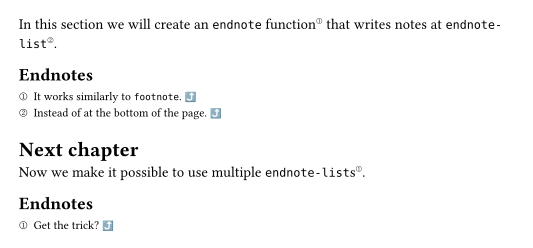
In this section we will create an `endnote` function#endnote[It works similarly to `footnote`.] that writes notes at `endnote-list`#endnote[Instead of at the bottom of the page.].

#endnote-list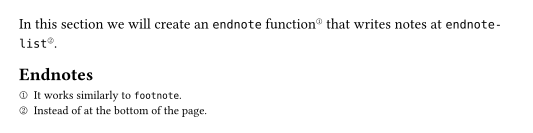
Now we make it possible to use multiple endnote-lists. Basically the trick is to replace query(<endnote>) with query(selector(<endnote>).before(here()).after(last-list)).
/// Add an endnote.
#let endnote(body) = {
  counter("endnote").step()
  context super(counter("endnote").display("①"))

  [#metadata(body)<endnote>]
}

/// Write the list of endnotes.
#let endnote-list = {
  [== Endnotes]
  set enum(numbering: "①")
  set text(0.8em)


  context {
    // 👇 This is the main changed part.
    let note-selector = selector(<endnote>).before(here())
    let last-list = query(
      selector(<endnote-list>).before(here()),
    ).last(default: none)
    if last-list != none {
      note-selector = note-selector.after(last-list.location())
    }

    let notes = query(note-selector)
    for x in notes [
      + #x.value
    ]
  }

  // Prepare for the next list.
  [#metadata(none)<endnote-list>]
  counter("endnote").update(0)
}

In this section we will create an `endnote` function#endnote[It works similarly to `footnote`.] that writes notes at `endnote-list`#endnote[Instead of at the bottom of the page.].

#endnote-list

= Next chapter
Now we make it possible to use multiple `endnote-list`s#endnote[Get the trick?].

#endnote-list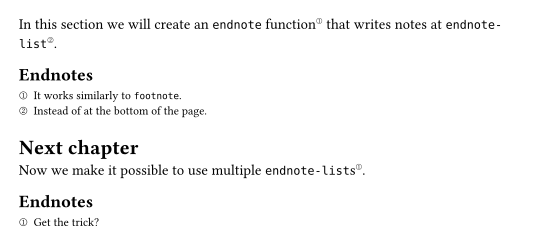
Finally, we add links to the endnotes and lists, so that readers can click them to switch between the main text and the endnotes.
Final code:
/// Add an endnote.
#let endnote(body) = {
  counter("endnote").step()
  context {
    let (n,) = counter("endnote").get()
    let entry = query(
      selector(<endnote-entry>).after(here()),
    ).at(n - 1)

    // Link to the entry in `endnote-list`.
    link(
      entry.location(),
      super(counter("endnote").display("①")),
    )
  }

  [#metadata(body)<endnote>]
}

/// Write the list of endnotes.
#let endnote-list = {
  [== Endnotes]
  set enum(numbering: "①")
  set text(0.8em)

  context {
    let note-selector = selector(<endnote>).before(here())
    let last-list = query(
      selector(<endnote-list>).before(here()),
    ).last(default: none)
    if last-list != none {
      note-selector = note-selector.after(last-list.location())
    }

    let notes = query(note-selector)
    for x in notes [
      + #metadata(none)<endnote-entry>
        #x.value
        // Link back to `endnote`.
        #link(
          x.location(),
          text(0.8em, sym.arrow.t.curve),
        )
    ]
  }

  // Prepare for the next list.
  [#metadata(none)<endnote-list>]
  counter("endnote").update(0)
}

In this section we will create an `endnote` function#endnote[It works similarly to `footnote`.] that writes notes at `endnote-list`#endnote[Instead of at the bottom of the page.].

#endnote-list

= Next chapter
Now we make it possible to use multiple `endnote-list`s#endnote[Get the trick?].

#endnote-list